 peekgentic
Guides · Office automation
Hire another office person, or automate? A cost calculator
Try it on a sample inboxBook a meeting or visit
Rather not meet? Text (469) 366-4397 or email admin@peekgentic.com
What the research says
- For U.S. private employers, wages are 70.0% of what an employee costs and benefits the other 30.0%, so the true cost is about salary ÷ 0.70 (roughly 1.43×). A $60,000 office hire costs about $85,700 a year before training or desk space. Source: U.S. Bureau of Labor Statistics, Employer Costs for Employee Compensation, June 2026.
- The calculator below defaults to 43% for that reason; change it to your own benefits rate.

Calculator
Enter your own numbers. Nothing is saved or sent.
What goes into each side
| Hire another person | Automate the typing | |
|---|---|---|
| Upfront | Recruiting time, training, ramp-up | A build to fit your desk and systems |
| Ongoing | Salary + benefits + taxes, every year | A monthly fee |
| When volume grows | Another hire | Same setup handles more |
| When someone leaves | Knowledge walks out with them | The rules live in the system |
| Control | Person does the work | Software drafts, a person approves every step |
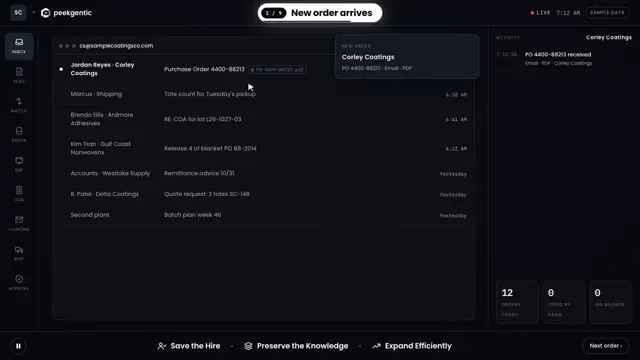
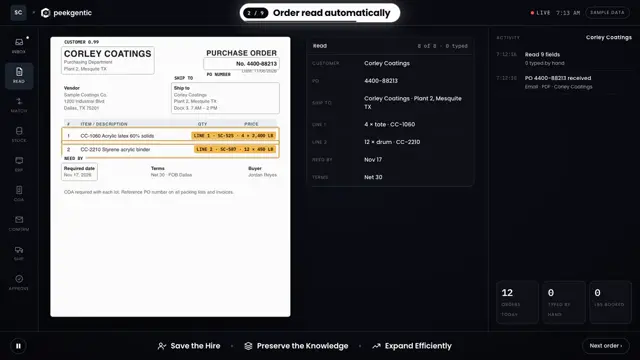
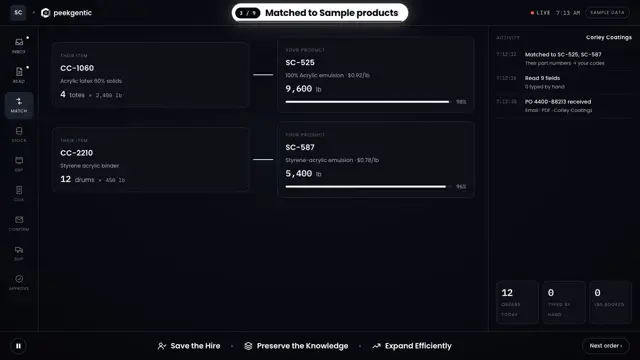
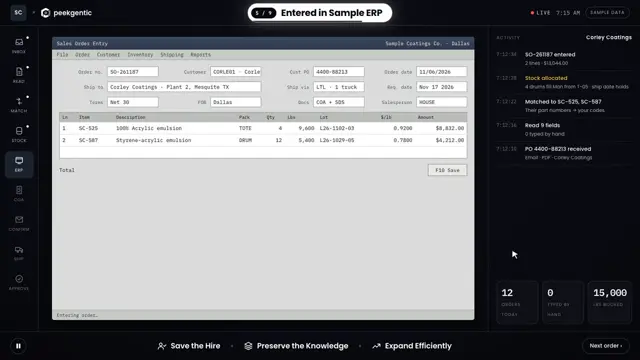
We build this for you. Custom software built around how your team already works: order processing, purchasing, parts and service orders, reports, AI assistants and more. A person approves every step, and nothing has to be replaced. See it: Order processing, custom-built → · Try it on a sample inbox → · Everything we build
When hiring is still the right call
- The role is mostly talking to customers, selling or solving unusual problems.
- Orders arrive in ways no system can read (handwritten, verbal only).
- Volume is tiny: a few items a week isn't worth automating.
A worked example (sample numbers)
Say the order desk is falling behind and you're about to post a $50,000 order-entry job. Here's how the two paths compare in year one, using sample numbers you should replace with yours.
Hire vs. automate, year one (sample numbers)
| Hire | Automate the typing | |
|---|---|---|
| Salary | $50,000 | None |
| Benefits and taxes (salary ÷ 0.70) | about $21,400 | None |
| Recruiting and ramp-up | Weeks to hire, months to full speed | Weeks to the first working piece |
| Build and running costs | None | Priced against the savings |
| If volume doubles | Another hire | Same setup, more volume |
| If the person leaves | Start over | The rules stay in the system |
Benefits share: U.S. Bureau of Labor Statistics, Employer Costs for Employee Compensation. Sample salary for illustration only.
A 10-question checklist before you post the job
- What share of the role is typing from one screen or PDF into another?
- How many items a week (orders, POs, invoices), and how many minutes each?
- Is the volume growing, flat or seasonal?
- Do a few customers or vendors send most of the documents?
- Does your ERP have an API, an import tool or a test company?
- Is the knowledge (part numbers, prices, ship-tos) written down, or in one person's head?
- What happens on the desk when that person is out sick?
- Which parts of the job need judgment, phone calls or relationships?
- Could your current person cover the role if the typing were gone?
- What would you do with the hours you get back?
If questions 1 to 6 point to "mostly typing, steady layouts, a way into the ERP," automate first and hire later if you still need to. If question 8 is most of the job, hire. Our before you hire page walks through it desk by desk.
The middle path most companies take
It's rarely all one or the other. The common pattern: automate the typing, keep the person who knows the customers, and give them the exceptions, the phone calls and the growth. For a Garland manufacturer, one desk process went from 4 hours to 15 minutes, and they've saved over $100K in under 8 months. The hire they were about to make turned into a job the same team could cover.
How long it takes: weeks to the first working piece. What it costs: how to size it.
FAQ
Should I hire another office person or automate?
If most of the new role is typing orders, POs or invoices into a system, automating that work usually costs less than the hire and grows with your volume. If the role is mostly judgment, phone calls or relationships, hire. Use the calculator on this page with your own numbers.
How much does a new office hire really cost?
Salary plus benefits, payroll taxes, equipment, recruiting and training. U.S. Bureau of Labor Statistics data (June 2026) puts benefits at 30% of total compensation, about 43% on top of salary, so a $60,000 hire costs about $85,700 a year. Use your own numbers in the calculator.
How is automation priced?
Peekgentic prices against the savings: a fixed-fee desk audit first, then a program priced so the first year's savings exceed what you pay.
Is there a real example?
Yes. Peekgentic builds order processing, purchasing and other office automation for companies in Dallas-Fort Worth. See what we build at peekgentic.com/case/.
Get more out of every person in your office.
Peekgentic is a Dallas firm that builds custom software around the way your team already works: orders, purchasing, invoices, spreadsheets, email. Not a one-size-fits-all platform you have to bend your process to fit. Your know-how goes into a system that's simple to use, so a new hire gets up to speed fast. We'll come watch how your office runs for 20 minutes and tell you straight where it's worth automating.