 peekgentic
The inefficiencies that cost the most are usually the ones that feel normal
Re-keying, workarounds, approval loops and spreadsheet handoffs rarely show up on a profit and loss statement. Why they stay invisible, how to find them in one afternoon, and when automation is not the fix.
In brief
The costliest inefficiencies in a 40 to 400 person company are rarely dramatic. They are small, repeated steps everyone has accepted: retyping an emailed order into the ERP, waiting on one person to approve, copying numbers between spreadsheets, checking work a second time because nobody trusts the first. They have no line item, they are spread across many people, and habit makes them feel normal. You find them by following one real order or invoice from start to finish and counting every touch.
- The costliest inefficiencies are small, repeated and accepted, not dramatic.
- They hide because they have no line item, are spread across many people, and habit makes them feel normal.
- Find them by following one real document end to end and counting touches, re-types and waits.
- Fix in order: remove, simplify, then automate the typing with a person approving.
- Automation is the wrong answer for steps that shouldn't exist, rare tasks and policy problems.
Walk into almost any office in Dallas-Fort Worth and ask what slows the team down. You will hear about the big things: a hard-to-use ERP, a customer who always changes orders, a supplier who never confirms on time. Those problems are real. They are also the ones everybody already knows about.
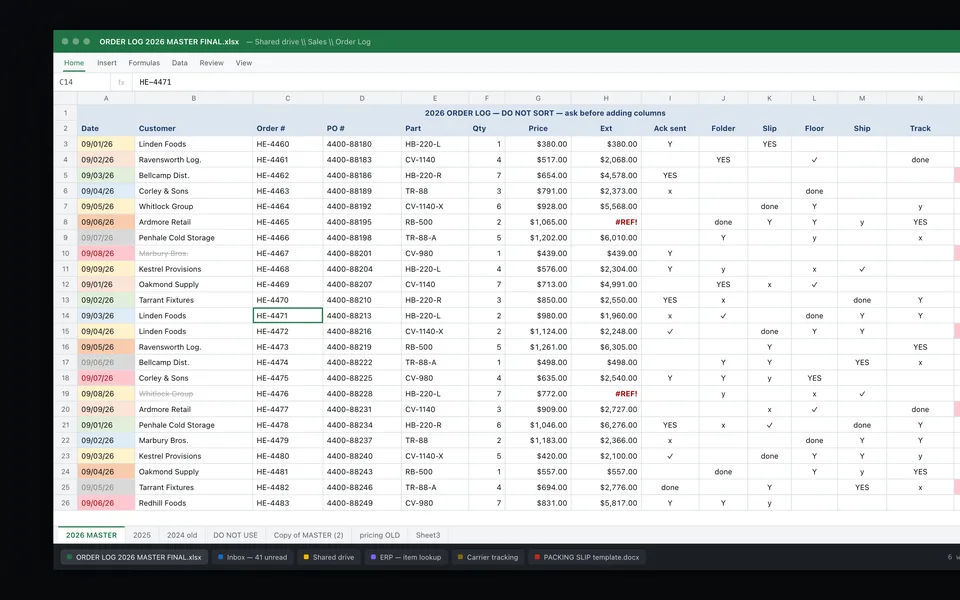
The costs that add up quietly are different. Nobody brings them up, because nobody sees them as problems. They are just how the work gets done. The order that comes in by email and gets typed into the system. The spreadsheet someone updates every morning so the warehouse knows what shipped. The second person who checks every invoice "just to be safe." The status update a customer only gets after they call.
The inefficiencies that cost the most are usually the ones that feel normal.
This guide is about those. Why they stay invisible, what the research says about how much of a workweek they take, how to find them in your own company in an afternoon, and what fixing them looks like, including when software is the wrong answer.
Why the biggest costs hide in plain sight
They have no line item. Your P&L shows payroll, rent and freight. It does not show "time spent retyping purchase orders" or "hours waiting on an approval." The cost is real, but it is buried inside salaries you were going to pay anyway, so it never gets reviewed the way a vendor invoice does.
They are spread across many people. One person loses ten minutes copying an order. Another loses five minutes looking up a price. A third loses fifteen minutes answering "where is my order?" No single person's day looks broken, so no single person raises it. Added up across a team and a year, it is often a full position's worth of time.
Habit makes them feel normal. Sociologist Diane Vaughan studied how capable organizations come to accept warning signs as routine. In her book on the Challenger launch decision, she described how NASA insiders, faced again and again with evidence that something was wrong, normalized the deviance so that it became acceptable to them. An office is not a launch pad, and the stakes are not the same. But the mechanism is familiar: a workaround that started as a temporary fix becomes "the way we do it," and after a year nobody remembers it was ever a workaround.
The workaround becomes a point of pride. The person who keeps the side spreadsheet that holds the whole operation together is usually one of your best people. They are not going to call their own system a problem, and you are not going to want to suggest it. That is how a fragile process ends up being treated as a strength.
What the research says about how much time this takes
Exact numbers vary by company, and most of the large surveys come from software vendors, so read them as directional. They still point the same way.
- A quarter of the week on repetitive work. In a survey of information workers, Smartsheet found that over 40% spend at least a quarter of their work week on manual, repetitive tasks, with email, data collection and data entry taking the most time. Nearly 60% estimated they could save six or more hours a week if the repetitive parts of their jobs were automated.
- Most of the day on "work about work." Asana's Anatomy of Work research found that knowledge workers spend about 60% of their day on work about work: searching for information, switching between apps, chasing status, instead of the skilled job they were hired to do.
- Spreadsheets carry errors nobody sees. Spreadsheet researcher Raymond Panko of the University of Hawaii reported that audits of 54 spreadsheets found errors in 49 of them. A spreadsheet handoff is not just slow. It is a place where mistakes travel quietly from one desk to the next.
None of these studies measured your company. What they show is that the time lost to routine, repeated steps is not a rounding error. It is a meaningful share of the week for a large share of office workers.
Five inefficiencies that feel normal at most companies
| What it looks like | Why nobody flags it | What it really costs |
|---|---|---|
| Re-keying. An order, PO or invoice arrives by email and someone types it into the ERP, then types parts of it again for the job or the paperwork. | It is "just data entry," and the person doing it is fast. | Minutes on every document, every day, plus the typos that turn into wrong shipments or wrong invoices. |
| Approval loops. A quote, credit or purchase waits in one manager's inbox. | Approvals feel like control, and the manager is busy for good reasons. | Delay. Customers wait, suppliers wait, and the team re-asks. |
| Spreadsheet handoffs. A shared log tracks what the ERP should already know: open orders, ship dates, backorders. | It works, and one person keeps it up to date. | Duplicate work, version confusion, and a single point of failure when that person is out. |
| Double checking. A second person reviews every item because the first step can't be trusted. | It feels like quality control. | Two people's time on every item, when the real fix is a first step that catches its own errors. |
| Status chasing. Customers call or email to ask where their order is. | Good service: someone always answers. | Interruptions all day, for information the system already has. |
Each of these is reasonable on its own. That is exactly why they last.
How to find them in one afternoon
Lean practitioners use the Japanese word gemba, "the actual place," for where the work really happens. The idea applies just as well to an office as to a shop floor: you learn more by watching one real transaction move than by reading a process document.
- Pick one real document. One customer order, one supplier invoice, one quote request from last week. Not the process in general: one specific item.
- Follow it from the moment it arrives to the moment it is done. For an order, that means from the email or portal to the invoice and the cash. Sit with each person who touches it.
- Count three things. How many times a person touches it. How many times the same information is typed again. How long it waits between steps.
- Ask "what do you do when...?" When the part number doesn't match. When the price is different from the quote. When the customer wants a partial shipment. The answers show you the rules that live only in someone's head.
- Look for the evidence of workarounds. Sticky notes, printed copies, side spreadsheets, a folder called "fix later," a whiteboard of exceptions. Each one is a step the system doesn't handle.
- Do the arithmetic. Minutes per item times items per week times 52. For example, three people who each spend 30 minutes a day retyping orders add up to 7.5 hours a week, or about 390 hours a year. Use your own numbers, not ours.
Most owners who do this once are surprised, not by any single step, but by how many there are.
What fixing them actually looks like
The order of operations matters.
First, remove steps that don't need to exist. Some checks were added after one bad week years ago. Some reports go to people who stopped reading them. Some approvals could be a simple rule ("anything under a set amount from an existing customer goes through"). Removing a step costs nothing.
Second, simplify what is left. One place for the information instead of three. One owner for each step. Clear rules for the common exceptions, written down instead of remembered.
Third, automate the typing, and keep a person approving. Once a step is worth keeping, software can usually do the reading and typing: pull the order out of the email, match it to the customer and the price list, fill it into the ERP, and flag what doesn't match for a person to decide. The person stops typing and starts approving. That is the shift that gives the time back without giving up control. Our first live build does exactly this for a food-equipment manufacturer that supplies national grocery chains.
Where automation is not the answer
To be fair, software is not always the fix, and sometimes it makes things worse.
- When the step shouldn't exist. Automating a pointless report just produces a pointless report faster. Remove it instead.
- When the process is still changing. If the team is still figuring out how something should work, settle it first. Automating a moving target locks in the confusion.
- When it happens rarely. A task that comes up a few times a month is seldom worth building around.
- When the real issue is a policy. If everything waits on one approver, the fix may be a rule change, not software.
- When your system already does it. Many ERPs have features nobody turned on. Check before you buy or build anything.
- When the work is a relationship. The call your best salesperson makes to a long-time customer is not an inefficiency. Leave it alone.
A quick test for your own company
Ask your team three questions this week. Their answers will tell you where to look first.
- What do you type that someone else already typed?
- What are you waiting on most often, and from whom?
- If you were out for two weeks, what would break?
The answers rarely sound like problems. They sound like "that's just how we do it." That is the point.
Common questions
What are hidden inefficiencies in a business?
Small, repeated steps that everyone has accepted as normal: retyping documents between systems, waiting on approvals, maintaining side spreadsheets, double checking work and answering status questions. They have no line item, so they rarely get reviewed.
Why don't managers notice them?
The cost is buried in salaries rather than shown as an expense, it is spread across many people a few minutes at a time, and habit makes long-running workarounds feel like the normal way of working.
How much time do repetitive tasks take?
Surveys vary, but Smartsheet found over 40% of information workers spend at least a quarter of their week on manual, repetitive tasks, and Asana's research found knowledge workers spend about 60% of their day on coordination work rather than the job they were hired for.
How do I find inefficiencies in my office?
Pick one real order or invoice and follow it from arrival to completion. Count every touch, every time information is retyped and every wait between steps, and ask each person what they do when something doesn't match.
Should I automate every inefficiency I find?
No. First remove steps that don't need to exist, then simplify, and only then automate the typing that remains, with a person approving. Rare tasks, processes still being designed and policy problems usually aren't worth automating.
Who helps Dallas-Fort Worth companies fix back-office inefficiencies?
Peekgentic is a Dallas firm that maps how orders, purchases and invoices move through an office and builds software around the systems a team already uses, with a person approving every step.
Sources
- Diane Vaughan, The Challenger Launch Decision, University of Chicago Press (enlarged edition)
- Smartsheet, “Workers waste a quarter of the work week on manual, repetitive tasks,” 2017 survey
- Asana, Anatomy of Work Index
- Computerworld, “Audits find errors in 49 out of 54 spreadsheets,” May 24, 2004 (research by Raymond R. Panko)
- Lean Enterprise Institute, Lean Lexicon: Gemba
 Which office task should you automate first?
 Six quotes on efficiency and process that still apply to your back office
 Why 95% of AI pilots fail, and why custom AI is the exception