 peekgentic
How do I stop retyping customer POs into my ERP?
Five ways to stop retyping customer purchase orders into your ERP, from EDI to a custom build, what each one needs, and a one-week test to pick yours.

In brief
You stop retyping customer POs by letting software read each PO (email, PDF, spreadsheet or scan), match the customer's part numbers and prices to yours, and draft the sales order in your ERP. A person on your team checks it and taps approve. You can get there five ways: EDI with your biggest customers, your ERP's own import tools, an order-automation product, a custom build, or a customer portal. Most companies with 40 to 400 employees end up mixing two of them. Start with the customers who send the most POs.
- Software reads the PO, translates part numbers, units and prices, and drafts the sales order; a person approves.
- Five ways: EDI, ERP import tools, an order-automation product, a custom build, a customer portal.
- Start with the few customers who send most of your POs.
- Test every option on your own 20 messiest POs.
Why POs get retyped in the first place
Your customers don't send orders in your ERP's format. They send what their own system prints: a PDF from SAP, a spreadsheet from a buyer, a photo of a handwritten sheet, a reply to last week's email. Every one uses their part numbers, their units and their ship-to codes. Someone on your team reads it and types it into a sales order. That person is the translator.
Retyping is slow, but the bigger cost is mistakes that ship: a wrong quantity, an old price, the wrong ship-to. Removing the typing means giving the software the same translation rules your person keeps in their head.
The five ways, side by side
Five ways to stop retyping customer POs
| Way | Best when | What it needs | Watch out for |
|---|---|---|---|
| EDI | A few big customers send most of your volume and already use EDI | An EDI provider and a map per customer | Small customers won't send EDI; each map is its own project |
| Your ERP's import tools | Orders arrive as clean spreadsheets or CSV files | A template per layout; someone to run the import | PDFs and emails still get typed |
| An order-automation product | Mostly emailed PDFs into a mainstream ERP | A subscription and a setup project | Odd channels and older ERPs; ask how layout changes get fixed |
| A custom build | Messy channels, an older or customized ERP, or work beyond orders | A builder and a few hours a week from your order desk | You need someone to keep it current |
| A customer portal | Repeat customers who reorder the same items | Customers willing to log in | Many buyers won't change how they order |
Product examples and what each vendor says it does: Conexiom alternatives and Esker vs. a custom build.
What "no retyping" looks like on a normal morning
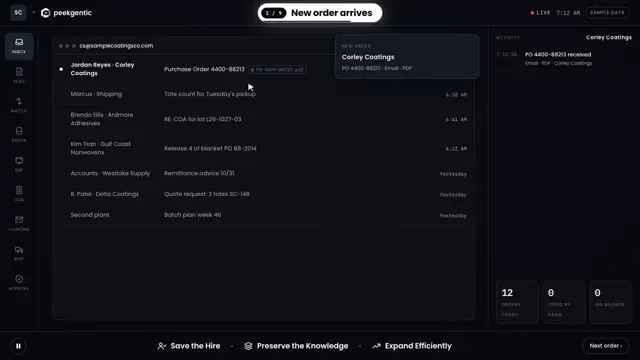
- The PO lands in the order inbox the way it always does.
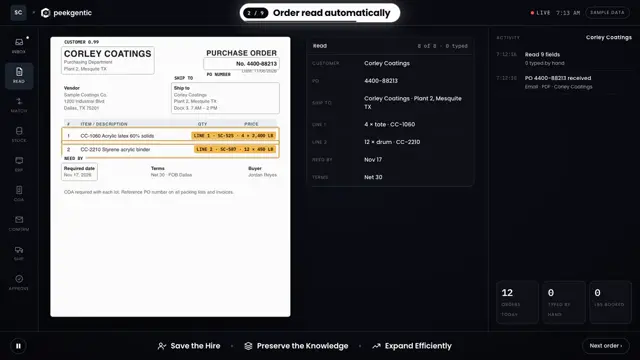
- The software reads it: customer, PO number, lines, quantities, units, prices, dates, ship-to.
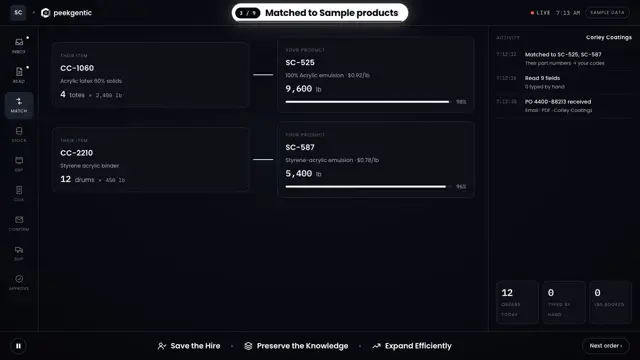
- It translates: the customer's part number becomes your item number, their unit becomes yours, the price is checked against the price list.
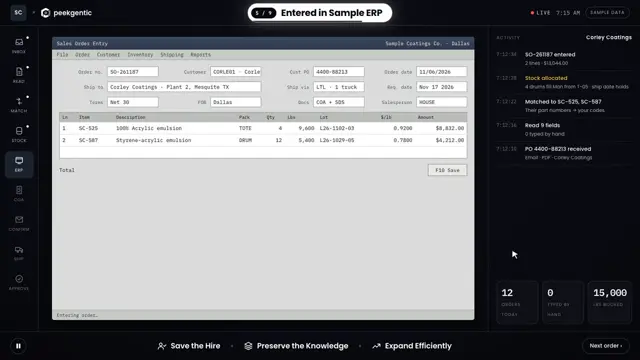
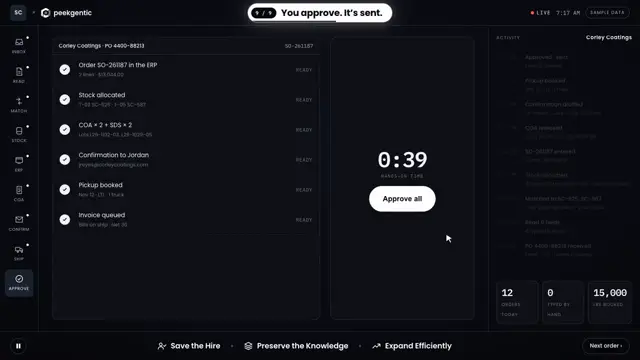
- It drafts the sales order in your ERP, or in a review screen before the ERP.
- A person approves. Anything that didn't match (a new part number, a price that's off, a date you can't meet) is flagged instead of guessed.
- The confirmation goes back to the customer, if you want it to.
The person who used to type now checks. On the orders that match cleanly, checking takes seconds.
A one-week test before you buy anything
- Count. For one week, tally every PO: which customer, which channel (email, PDF, spreadsheet, portal, fax), how many lines.
- Time ten of them with a stopwatch, from opening the email to saving the order.
- Find the 80%. Usually a handful of customers and two or three layouts are most of the volume.
- Pull your 20 messiest POs and give the same 20 to every option you're considering. Count the lines that came out right with no edits.
- Ask who fixes it when a customer changes their PO layout, and how fast.
Hours a week saved = POs a week × minutes each × the share that's typing. Our scorecard does the math.
What makes it work (and what breaks it)
- A clean cross-reference of customer part numbers to your item numbers. If it lives in one person's head, write it down first. See cleaning data before AI.
- A way into your ERP: an API, an import tool, or a test company to try it safely. See automating without replacing your ERP.
- A person approving every order, at least at the start. Approval is what makes it safe to turn on.
- What breaks it: trying to cover every customer on day one, skipping the review step, or nobody owning the rules when a customer changes their layout.
Where we come in
We're a Dallas-Fort Worth team based in Garland, Texas. We build the reading, matching and posting around the ERP you already run, and a person on your team approves each order. For a Garland manufacturer, one desk process went from 4 hours to 15 minutes, and they've saved over $100K in under 8 months. The full walk-through is in how to automate order entry.
Common questions
How do I stop retyping customer POs into my ERP?
Let software read each PO, match the customer's part numbers and prices to yours, and draft the sales order in your ERP for a person to approve. You can do it with EDI, your ERP's import tools, an order-automation product, a custom build or a customer portal. Most mid-size companies mix two of them.
Do I need EDI to stop retyping POs?
No. EDI works for big customers who already use it. Emailed PDFs and spreadsheets can be read by software and turned into draft orders without EDI.
Will the software enter orders without anyone checking?
It shouldn't, at least at first. The safe setup drafts each order and a person approves it. Anything that doesn't match, like a new part number or a price that's off, is flagged instead of guessed.
What do I need before I start?
A week of PO counts, a list of your top customers by volume, a cross-reference of their part numbers to yours, and a way into your ERP such as an API, an import tool or a test company.
How long does it take to stop retyping POs?
Weeks to the first working piece and a few months to a full order desk. See peekgentic.com/guides/how-long-order-entry-automation-takes.
Who can set this up in Dallas-Fort Worth?
Peekgentic, a team based in Garland, Texas, builds order entry automation around the ERP you already use, with a person approving each order.
 Order entry automation: how to automate order entry from email and PDF POs
 Conexiom alternatives: who else automates order entry, and when each one fits
 Orders from customers who won't do EDI: how to automate email and PDF orders