 peekgentic
ChatGPT vs. custom AI for business processes: when each one works
ChatGPT, Claude and Copilot are great for one person's drafting and research. Repeat work that touches your ERP needs fixed steps, your rules and a person approving exceptions. What the research says about each, and a simple test for which one a job needs.
In brief
Use ChatGPT, Claude or Copilot for work one person does and checks: drafting, summarizing, research, one-off analysis. Studies show real gains there. Use custom AI for a process that repeats hundreds of times a week, follows your rules, and lands in your ERP or accounting system, like entering emailed orders or matching invoices. A chat window can't give you the same steps every time, a connection to your system, or a log of who approved what. Most mid-size companies need both, for different jobs.
- Chat tools like ChatGPT, Claude and Copilot are strong helpers for one person's drafting, summarizing and research.
- Studies show real gains there, and a sharp drop in accuracy on tasks just outside what the AI does well.
- Repeat work that lands in your ERP needs the same steps every time, your rules, a system connection and a person approving exceptions.
- Custom AI uses similar models. What's custom is the process built around them.
- Most companies need both: a business chat plan for everyone, and one repeat process built and measured at a time.
The question we hear most
"We already pay for ChatGPT. Why would we need anything custom?" It's a fair question. The business chat tools got much better in the last two years. They read your files, connect to your email and drive, and the business plans come with privacy terms a careful IT person can live with.
The honest answer is that a chat tool and a custom-built process are made for different jobs. One is a very smart assistant for a person. The other is a piece of your operation that runs the same way every time. Below is what each one does well, where each one runs out, what the research says, and a short test you can use on any task in your office.
A note on names: we say "ChatGPT" here because that's what most people call all of these tools. The same points apply to Claude and Microsoft Copilot.
Two tools, two different jobs
Chat assistant vs. custom AI process
| A chat assistant (ChatGPT, Claude, Copilot) | A custom AI process |
|---|---|
| Helps one person think, write and look things up | Runs one job for the whole team, the same way every time |
| A person starts it, reads the answer and decides | Starts when the work arrives: an email, a PDF, a portal order |
| Output is text you copy somewhere | Output lands in your ERP, accounting system or spreadsheet |
| Every person writes their own prompts | Your rules are written down once and applied to every item |
| Hard to measure across a team | Measured per item: minutes, errors, items per person |
| Ready today, little setup | Has to be designed, connected and tuned to your work |
What chat tools do well, and the research behind it
The gains from general AI assistants are real when a person does the work and checks the result. Two of the best studies show it.
In a study of 5,179 customer support agents, published by the National Bureau of Economic Research, an AI assistant raised the number of issues resolved per hour by 14% on average, and by 34% for newer, less experienced agents. The tool suggested replies; the agents decided what to send.
A Harvard Business School and BCG experiment with 758 consultants found something similar, with a warning attached. On tasks the AI was good at, consultants using GPT-4 finished 12.2% more tasks, worked 25.1% faster and produced work rated more than 40% higher in quality. But on a task picked to be just outside what the AI could do well, consultants using it were 19 percentage points less likely to get the right answer than those without it. The researchers called this a "jagged frontier": the AI is great at some tasks and confidently wrong at others that look similar.
Where a chat assistant helped, and where it hurt
Results from two controlled studies of workers using AI. Each bar is a change compared with people working without it.
Sources: Brynjolfsson, Li and Raymond, NBER Working Paper 31161 (2023); Dell'Acqua et al., HBS Working Paper 24-013 (2023).
That is the right way to think about a chat tool at work. It is a strong helper for a person who knows the job well enough to catch its mistakes.
Plenty of people already use it that way. Pew found in 2026 that 38% of employed U.S. adults use chatbots for tasks at work, and Gallup's tracking shows 15% of U.S. employees used AI daily as of May 2026. Among businesses your size, the Census Bureau's survey found 32% of firms with 100 to 249 employees said they used AI. All three are surveys.
The business versions also fixed the biggest early worry, which was your data training someone's model. OpenAI's enterprise privacy page says it does not train its models on your data by default for its business products. Anthropic says the same for Claude's Team and Enterprise plans, and Microsoft says prompts and responses in Copilot aren't used to train its foundation models. That applies to the paid business plans, not to an employee's personal account.
Where chat tools run out
The trouble starts when a company tries to turn a chat window into a process. Take the most common job we see in a manufacturer's or distributor's office: a customer emails a PO as a PDF, and someone enters it into the ERP.
It doesn't do the same thing every time. Ask a chat tool to read 200 POs and you'll get 200 slightly different answers in slightly different formats, depending on who asked and how. A process needs the same fields, in the same order, checked against the same rules, every time.
It guesses when it should stop. A widely cited 2025 research paper argues that language models make things up because training and testing reward guessing over admitting they aren't sure. Microsoft's own documentation says Copilot's answers aren't guaranteed to be 100% factual. That's fine when a person reads every answer. It is not fine when an invented part number goes straight into an order.
A chat tool is a helper for a person. An order desk needs a process.
It doesn't know your rules. Your best order-entry person knows that one customer's "blue" means a specific model, that another always wants partial shipments, and that a price more than a few percent off the contract needs a call. That knowledge isn't in the chat tool. Each employee would have to type it into their own prompts, and they won't all do it the same way.
It doesn't land in your system. The answer is text in a chat window. Someone still copies it into Sage, Epicor or QuickBooks. You saved the reading, but kept the typing, and you added a step.
It doesn't learn from corrections. MIT's 2025 research on why so many company AI pilots stalled called this a "learning gap": generic tools like ChatGPT work well for individuals but stall in companies because they don't learn from or adapt to the workflow. The same research found the biggest returns in back-office automation. We looked at that study in detail in why most AI pilots fail.
It's hard to control where data goes. When the company doesn't give people a tool that fits the job, they use their own. IBM's 2025 data breach study found that one in five organizations reported a breach due to shadow AI, and only 37% have policies to manage AI or detect it. Organizations with high levels of shadow AI saw about $670,000 more in breach costs on average. The best-known example is Samsung, which restricted generative AI tools in 2023 after internal data was accidentally leaked to ChatGPT.
What "custom AI" actually means
Custom AI does not mean training your own model or building a data center. It usually uses the same kind of models that power ChatGPT and Claude. The difference is everything built around the model:
- It starts on its own when the work shows up: an email in the orders inbox, a PDF, an order in a customer portal.
- It follows written rules for your customers, part numbers, prices and ship-to addresses, the ones that live in your best person's head today.
- It checks against your system before it does anything, and stops and asks a person when something doesn't match instead of guessing.
- It puts the result where it belongs: in the ERP, the accounting system or the shared spreadsheet, not in a chat window.
- It keeps a record of what it read, what it entered and who approved it.
- It gets tuned when it meets real work, so the same exception doesn't need a person twice.
That last point is what the research keeps coming back to. Gartner's April 2026 survey of 782 infrastructure and operations leaders found that only 28% of AI use cases fully succeeded. As The Register's report on the survey put it, AI that doesn't fit into how an organization operates can't deliver a return. McKinsey's 2026 State of AI survey, as summarized by law firm Lewis Silkin, found that 37% of companies report AI adding to earnings, and the top performers are redesigning workflows around AI rather than inserting AI into the old ones.
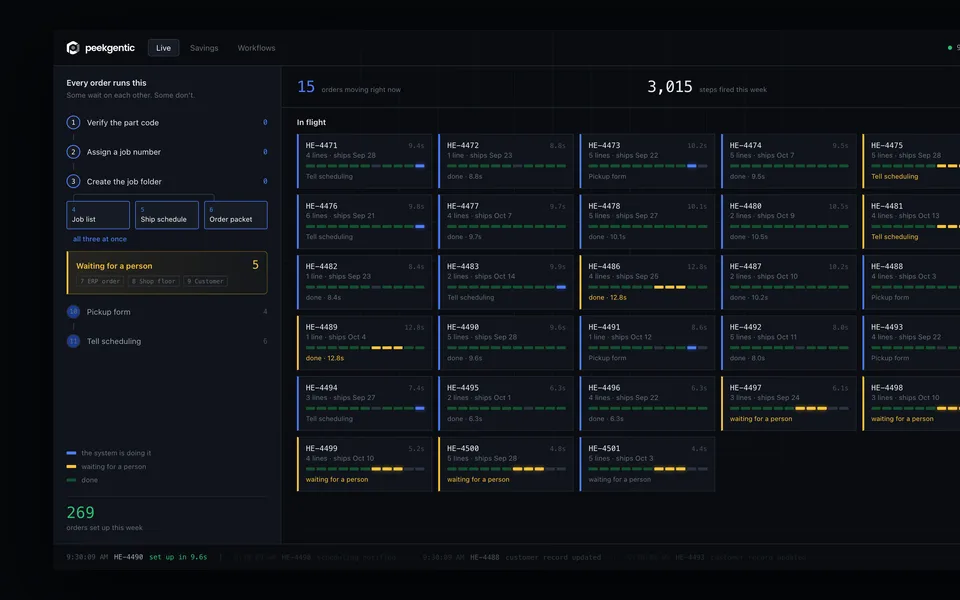
Here's what that looks like at one desk. Our first live build is for a food-equipment manufacturer that supplies national grocery chains. The software reads each customer order and fills it in, and their team approves it. Nobody on that team had to learn to write prompts.
A five-question test for any task
Run any job in your office through these questions. The more "yes" answers, the more it needs a built process instead of a chat window.
- Does it happen many times a week? Ten POs a month is a chat job. Fifty a day is a process.
- Are the steps mostly the same each time? Read, match, check, enter. If the steps repeat, they can be written down once.
- Does the result go into a system of record? If it ends in the ERP, accounting or inventory, someone will copy and paste it unless it's connected.
- Is a mistake expensive? A wrong price, quantity or ship-to costs real money. That needs checks and a person approving exceptions, every time.
- Do several people do this job? If three people each use their own prompts, you get three versions of the process and no way to measure it.
Common office jobs, sorted
| Usually fine in a chat tool | Usually needs a built process |
|---|---|
| Drafting a reply to an unhappy customer | Entering emailed and PDF purchase orders |
| Summarizing a long contract or spec | Matching supplier invoices to POs and receipts |
| Writing a job posting or a procedure | Sending order confirmations and lead-time updates |
| A one-time analysis of a spreadsheet | Building quotes from RFQs with your pricing rules |
| Researching a new supplier or market | Pulling orders out of customer portals into the ERP |
Where the other side has a point
The line between these two is moving. ChatGPT now has workspace agents that can connect to other apps and run on a schedule, as reported by Decrypt, with an option for admins to require human approval for sensitive actions. Claude's business plans connect to Google Drive, Gmail, Microsoft 365 and Slack. Google just announced an agent that works across Workspace. For a small team with simple, low-volume work, these may be all you need, and they cost far less effort to try than anything built.
Custom also has real costs. It takes time to design, it has to be connected to your systems, and someone has to look after it when a customer changes its PO format. If a job happens a few times a month, or nobody can say what it costs today, don't build anything. Use the chat tool.
The question isn't really ChatGPT or custom. It's whether a given job is one person's work or the company's process. Agents in chat tools will handle more of the in-between over time. The high-volume desks, where the same mistake can repeat a hundred times before anyone notices, will still need the steps, the rules, the connection and the approvals designed on purpose.
How to use both, starting this month
- Give people a business plan, not a personal one. Pick ChatGPT, Claude or Copilot on a business plan, and write a one-page rule about what data can go in it. That alone cuts most of the shadow-AI risk.
- Show people what it's good at. Drafting, summarizing, research. And show them what it's bad at: anything they can't check.
- Pick one repeat process. The desk where the most hours go to reading and retyping. Time it for a week: minutes per item and items per week.
- Build that one process properly. Your rules written down, connected to your system, a person approving exceptions, every step logged.
- Measure it again, then decide on the next one.
Common questions
Can ChatGPT automate business processes?
It can help with parts of them, and its newer agent features can connect to apps and run on a schedule. But a chat tool doesn't give you the same steps every time, your written rules, a direct connection to your ERP or a record of who approved what. High-volume processes like order entry usually need those built in.
What is the difference between ChatGPT and custom AI?
ChatGPT is a general assistant one person uses and checks. Custom AI uses similar models but wraps them in your process: it starts when the work arrives, follows your rules, checks against your systems, asks a person when something doesn't match, and puts the result in your ERP or accounting system.
When is ChatGPT enough for a business?
For drafting, summarizing, research and one-off analysis, where a person reads the result. Studies found strong gains there, including 14% more issues resolved per hour in customer support and faster, better work on tasks the AI handles well.
Is it safe to put company data in ChatGPT?
On business plans, OpenAI says it does not train its models on your data by default, and Anthropic and Microsoft say similar things for Claude and Copilot. Personal accounts are different. IBM found one in five organizations reported a breach due to shadow AI.
Does custom AI mean training our own model?
No. Custom AI usually uses the same kind of models behind ChatGPT and Claude. What is custom is the process around it: your documents, your rules, your system connection and your approval steps.
How do I decide which tasks need custom AI?
Ask five questions: does it happen many times a week, are the steps mostly the same, does the result go into a system of record, is a mistake expensive, and do several people do it. The more yes answers, the more it needs a built process.
Who builds custom AI for manufacturers and distributors in Dallas-Fort Worth?
Peekgentic is a Dallas firm that builds custom AI automation around the systems and workflows a company already uses, with a person approving every step.
Sources
- Brynjolfsson, Li and Raymond, “Generative AI at Work,” NBER Working Paper 31161, 2023
- Dell'Acqua et al., “Navigating the Jagged Technological Frontier,” HBS Working Paper 24-013, Sept. 2023
- Pew Research Center, “Americans and AI 2026,” June 17, 2026
- Gallup, AI in the workplace indicator, 2026
- U.S. Census Bureau, AI use by businesses, May 26, 2026
- OpenAI, Enterprise privacy, updated Jan. 8, 2026
- Anthropic, Claude plans
- Microsoft Learn, Data, privacy and security for Microsoft Copilot, 2026
- Kalai, Nachum, Vempala and Zhang, “Why Language Models Hallucinate,” Sept. 2025
- Fortune, MIT report on generative AI pilots, Aug. 18, 2025
- IBM, Cost of a Data Breach Report 2025, July 30, 2025
- TechCrunch, Samsung restricts generative AI tools after internal data leak, May 2, 2023
- The Register, on Gartner's April 2026 survey of I&O leaders, April 7, 2026
- Lewis Silkin, summary of McKinsey's State of AI 2026, Aug. 25, 2026
- Decrypt, OpenAI workspace agents in ChatGPT, April 22, 2026
 Why 95% of AI pilots fail, and why custom AI is the exception
 Custom software vs. off-the-shelf for a mid-size manufacturer
 How to automate order entry from email and PDF purchase orders